
Store Locator and Interactive Map Plugin for WordPress
Easy Map helps you create store locator maps in WordPress with business locations, interactive markers, and OpenStreetMap support without API key setup.
- 30 Days Money Back Guarantee.
- Industry Expert Support Team
-
No API Key with
OpenStreetMap -
Add Multiple Business
Locations -
Google Maps, Mapbox Maps
& OpenStreetMap -
Shortcode / Gutenberg
Block Support -
Built for WordPress
Websites
- No API Key with OpenStreetMap
- Add Multiple Business Locations
- Google Maps, Bing Maps & OpenStreetMap
- Shortcode / Gutenberg Block Support
- Built for WordPress Websites

About Easy Map
What Is Easy Map?
Easy Map is a store locator plugin for WordPress that helps website owners create interactive maps for business locations, branches, offices, service areas, and directories. Instead of building a custom map manually, users can add locations, place markers, choose a map provider, and display the map on WordPress pages using available embedding options.
It’s built for local businesses, franchises, agencies, and WordPress users who want a clean, beginner-friendly way to show physical locations on a map — without writing custom code.
No API Key Required
Create WordPress Store Locator Maps
Without API Key Setup
Easy Map gives WordPress users a flexible way to build location maps without depending only on Google Maps API setup.
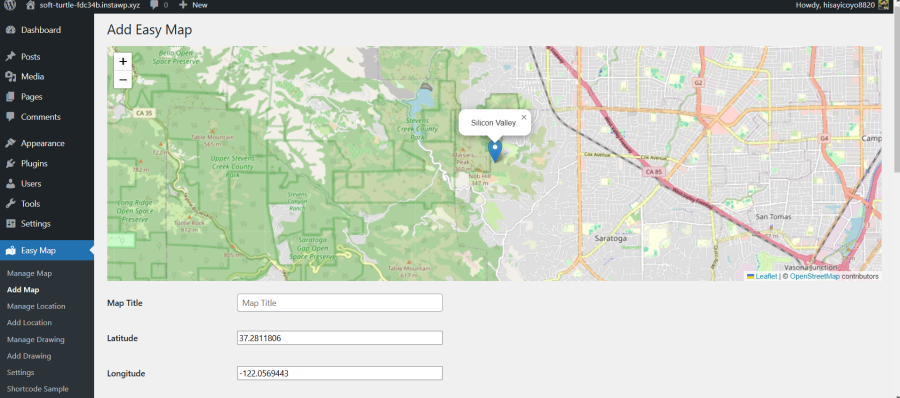
OpenStreet Map Support
Use OpenStreetMap as a flexible, open map provider that works right out of the box for store locator maps.
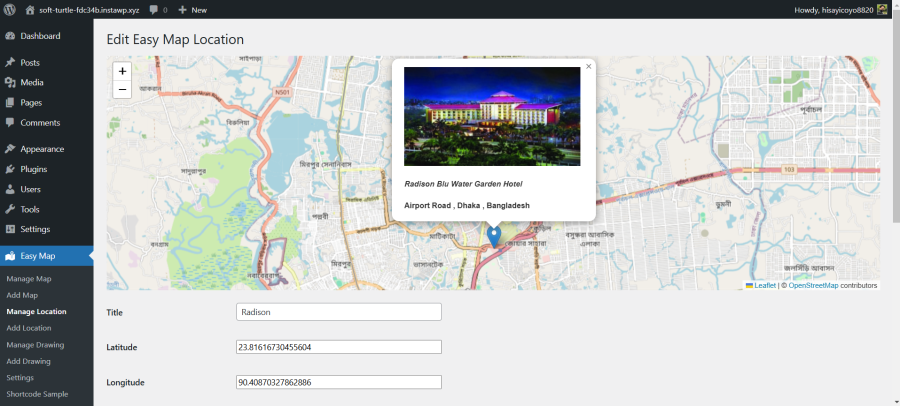
Avoid API Key Complexity
Skip Google API setup, billing configuration, and technical hurdles — just install, configure, and publish your map.
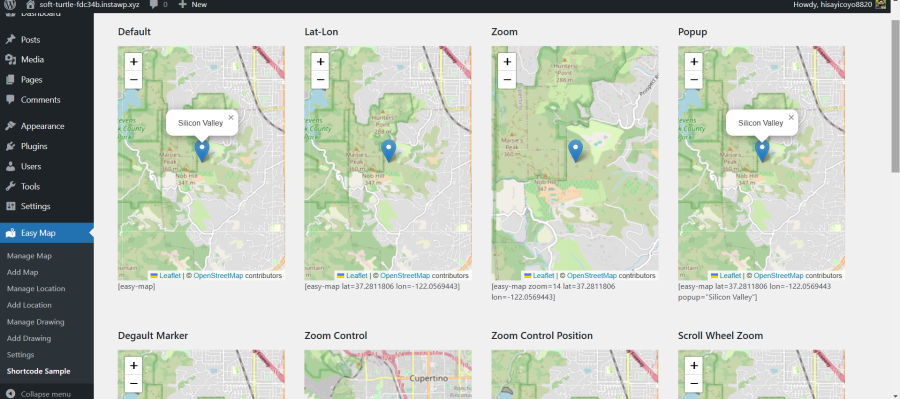
Multiple Provider Flexibility
Switch between OpenStreetMap, Google Maps, and Bing Maps so each project gets the right map for the job.
Key Features
Easy Map Features for WordPress Store
Locator Websites
Easy Map includes practical features for creating location maps, adding markers, choosing map providers, and displaying maps on WordPress pages.
Multiple Map Providers
Work with OpenStreetMap, Google Maps, and Bing Maps so you can pick the provider that fits your project and audience.
Business Location Markers
Add markers for stores, offices, branches, service areas, and directory listings on a single WordPress map.
Store Locator Display
Create location-focused maps that help visitors find nearby branches, outlets, or physical service points fast.
Shortcode Support
Drop maps into any WordPress page, post, or landing layout with a simple shortcode in seconds.
Gutenberg Block
Add and preview maps directly inside the WordPress block editor for a fully visual editing experience.
Custom Marker Icons
Use branded marker icons that match your visual identity and make each location instantly recognizable.
Marker Clustering
Automatically group nearby markers so dense maps stay clean and easy to scan at every zoom level.
Geo Search Option
Let visitors search by address or city and instantly jump to the nearest matching location on the map.
Locations
Who It's For
Who Can Use Easy Map?
Easy Map is useful for businesses and websites that need to display physical locations,
branches, service areas, or directory-style map listings.

Retail Stores
Show all branches and outlets on a WordPress map.

Restaurants & Cafes
Display nearby branches or dining locations.

Clinics & Healthcare
Help visitors find offices, clinics, and service points.

Franchise Businesses
Show multiple branches from one location map.

Service Area Businesses
Display the areas your business serves.

Real Estate & Directories
Create map-based listings for locations.

Agencies
Create map-based listings for locations.

Local Businesses
Add a simple business location map to WordPress.
How It Works
How Easy Map Works
Easy Map is designed to help WordPress users create and display location maps without
needing to build a custom map from scratch.
01
Install Easy Map
Install and activate Easy Map from your WordPress dashboard in just a couple of clicks.
02
Create a Map
Create a new map and configure the basic map settings like zoom, center, and style.
03
Add Locations
Add stores, branches, offices, or service areas as map markers with addresses and details.
04
Choose Provider
Select OpenStreetMap or another supported provider and pick your display options.
05
Publish with Block
Insert the map on any WordPress page using shortcode or the Gutenberg block.
Comparison
Why Choose Easy Map Instead of a Google
Maps-Only Plugin?
Easy Map is useful for WordPress users who want store locator functionality with flexible map
provider options and simpler setup choices.
| Feature / Need | Easy Map | Google Maps-Only Plugins |
|---|---|---|
| OpenStreetMap support | Yes | Usually limited or unavailable |
| No API key option | Available with OpenStreetMap | Often requires Google API setup |
| Multiple map provider flexibility | Supported | Usually Google-focused |
| Store locator use case | Supported | Supported |
| WordPress shortcode / block | Supported | Varies by plugin |
| Beginner-friendly setup | Focused on simplicity | Can depend on API setup |
Pricing
Easy Map Pricing Plans
Start with the free version or upgrade to Easy Map Pro for advanced markers, multiple
locations, geo search, and premium support.
Single Site
Best for one business website
$
36
/ year
License for 1 website
- Near Me & Proximity Search
- Marker Clustering
- 4 Premium Store Locator Layouts
- Marker Bump & Blink Animations
- Custom Styling & Popup Controls
- WooCommerce Product Filter
- Filter by Service
- Custom Marker Image Upload
- 7 Marker Popup Templates
- Social Share
- CSV Import/Export
- GeoJSON Import/Export
- Airplane Routing
- Premium support
- Plugin updates
☆ RECOMMENDED
Five Sites
Recommended for agencies and growing businesses
$
79
/ year
License for 5 websites
- Near Me & Proximity Search
- Marker Clustering
- 4 Premium Store Locator Layouts
- Marker Bump & Blink Animations
- Custom Styling & Popup Controls
- WooCommerce Product Filter
- Filter by Service
- Custom Marker Image Upload
- 7 Marker Popup Templates
- Social Share
- CSV Import/Export
- GeoJSON Import/Export
- Airplane Routing
- Premium support
- Plugin updates
Ten Sites
Best for agencies and multi-site projects
$
99
/ year
License for 10 websites
- Near Me & Proximity Search
- Marker Clustering
- 4 Premium Store Locator Layouts
- Marker Bump & Blink Animations
- Custom Styling & Popup Controls
- WooCommerce Product Filter
- Filter by Service
- Custom Marker Image Upload
- 7 Marker Popup Templates
- Social Share
- CSV Import/Export
- GeoJSON Import/Export
- Airplane Routing
- Premium support
- Plugin updates
Easy Map Documentation
Follow Easy Map documentation to understand setup, usage, shortcode options, and available map features.
24-Hour Support Availability
Get support for Easy Map setup, plugin questions, and product guidance within 24 hours.
30-Day Money-Back Guarantee
Explore premium Easy Map features with a 30-day money-back guarantee for extra confidence.
See It Live
See Easy Map in Action
Preview how Easy Map displays locations, markers, and map layouts before adding it to your own WordPress website.
Additional Plugins
You May Also Love Our Additional Plugins
Maximize Efficiency and Professionalism for Your Online Store with Our Dedicated WooCommerce Plugins.

Product Video Gallery for WooCommerce
Enhance your WooCommerce store with the Product Video Gallery plugin, designed to showcase your products with engaging videos. This powerful plugin allows you to integrate stunning video galleries directly into your product pages, boosting user engagement and increasing conversions.

Easy Player – HTML5 Video,YouTube,Video.js
Add a video player with Video.js: a web video player built from the ground up for an HTML5 world. It supports HTML5 video and modern streaming formats, as well as Mp4, YouTube and Vimeo.
Frequently Asked Questions
WP Easy Soft plugins are supported with helpful documentation, setup guidance,
responsive support, and a money-back guarantee for added confidence.
Easy Map is a store locator plugin for WordPress that helps users create location maps, add business markers, and display maps on WordPress pages. It is useful for stores, offices, franchises, directories, service areas, and other location-based websites.
Easy Map can be used with OpenStreetMap, which helps users create WordPress maps without Google Maps API key setup. If users want to use Google Maps or other supported providers, additional configuration may be required depending on the provider.
Yes. Easy Map supports OpenStreetMap, making it a useful option for WordPress users who want a flexible map solution without depending only on Google Maps.
Yes. Easy Map can be used to display multiple locations such as stores, branches, offices, service areas, or directory listings. This makes it useful for businesses that need a location-based WordPress map.
Yes. Easy Map can be displayed on WordPress pages or posts using available embedding options such as shortcode or block support, depending on the plugin setup.
Easy Map is built as a beginner-friendly WordPress map plugin because it helps users create location maps without custom development. Users should still follow the documentation for correct setup and configuration.
Yes. Users can start with the free version of Easy Map and upgrade to Easy Map Pro when they need advanced features such as custom marker icons, dynamic multiple locations, marker clustering, geo search, and premium support.